
IoT companies need a secure way to connect their devices to backend infrastructure. They also need rapid development cycles so their development teams can release new versions of their applications quickly, using a microservices architecture that securely handles millions of requests from devices deployed across farms.
They also needed a way to securely send device information to their API.
Backend Infrastructure
For the backend infrastructure, we came up with a scalable solution using Amazon EKS. This allowed us to take advantage of the rich EKS ecosystem, including add-ons for persistent storage using Amazon EBS, networking drivers that assign AWS VPC IP addresses to Kubernetes pods, and more.
The customer wanted to run POCs quickly and deploy different services, so Kubernetes was a good solution that could help us achieve this. It allowed us to manage multiple services, deployments, and other resources efficiently.
Environments
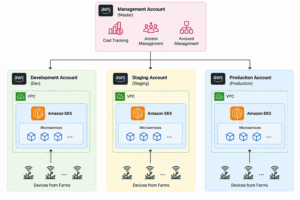
The customer wanted to have at least three environments that could be extended later. These environments were development, staging, and production. For each environment, we created a separate AWS account.
We also kept the management account separate, allowing us to track costs and manage access to each environment’s AWS account. In total, we had four AWS accounts: management, development, staging, and production.
Importantly, these environments needed to be similar, as we would mostly deploy the same set of services across them. Once this became clear, we needed to start creating the environments and experimenting with different configurations.
IaC – Terraform
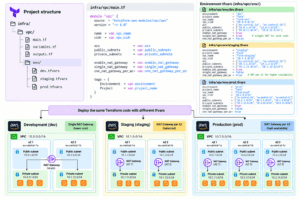
As it became clear that we needed multiple environments, we agreed to use Terraform to provision the infrastructure. Ideally, we wanted a structure where we wouldn’t need to duplicate Terraform code for each environment, but rather parameterize it using tfvars files. This allowed us to use the same Terraform code to deploy infrastructure across different environments, with environment-specific variables.
We used the same Terraform code for development, staging, and production environments by parameterizing the configurations using tfvars files. For example, we used the Terraform VPC module and configured a single NAT Gateway for development to reduce costs, while using multiple NAT Gateways in production to improve availability and handle higher traffic.
Networking and API Access
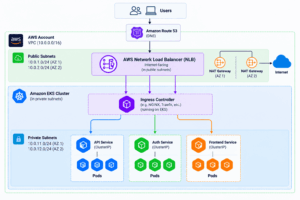
For the VPC layer, we had public and private subnets—a standard architecture where NAT Gateways provide services deployed in private subnets with outbound internet access.
We also configured an AWS Network Load Balancer (NLB) in public subnets to handle incoming traffic. Each application service was deployed in private subnets within the EKS cluster.
We used an Ingress Controller to route incoming requests to the corresponding Kubernetes services based on their hostnames. Routing configurations were defined through Helm charts, allowing us to deploy new services and automatically configure their routing without manually modifying the load balancer.
EKS was given permissions to add route53 records, so that when helm charts were updated and a new service was added, it would automatically add the route53 records to support the new service.
Here is the high-level architecture:
CI/CD Pipelines and ArgoCD
For CI/CD pipelines, the customer already had a contract with CircleCI, so we decided to stick with it.
However, we also wanted to implement GitOps practices, which is why we decided to use Argo CD. Flux was also considered, but we preferred Argo CD because it provides a UI that gives us better visibility into application deployments and their synchronization status.
We used a trunk-based development approach, where developers worked on short-lived branches that were merged into the main branch. Each merge automatically triggered a deployment to the development environment.
The workflow looked like this.
ArgoCD
ArgoCD was installed in Kubernetes in a dedicated namespace. It was used to manage Helm charts and apply changes to the cluster. ArgoCD also had access to a separate GitOps repository, which was created to maintain container image versions, environment variables, and secret references for applications. The secret references pointed to secrets stored in AWS Secrets Manager.
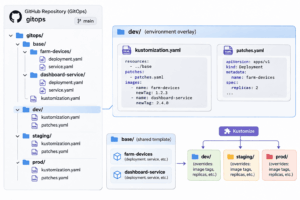
In the GitOps GitHub repository, we used only the main branch, separating environments into different folders: dev, staging, and prod. All three environments were mostly identical, so we used Kustomize to manage environment-specific parameters while reusing the same base configuration. Kustomize was also used to render Helm charts with environment-specific configurations before applying them to the cluster.
 by
The company used Okta to manage access to its tools. We also integrated Okta with ArgoCD through SAML for compliant access.
Releasing a New Version
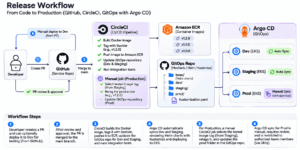
The customer had multiple services, and the development team preferred to maintain separate repositories for each service rather than using a monorepo. Therefore, we implemented the following development and deployment workflow.
Developers could create a pull request (PR) and manually trigger a deployment to the development environment to test their changes. Once a PR received at least one approval, it could be merged into the main branch.
Upon merging into the main branch, the deployment process was automatically triggered for both development and staging, followed by integration tests.
Each project built its own Docker image and pushed it to a centralized Amazon ECR repository managed by the platform team. We used a semantic versioning (SemVer) strategy for tagging container images.
Once the image was built and pushed to ECR, GitHub Actions automatically updated the corresponding image versions in the GitOps repository for development and staging.
Argo CD was configured with automatic synchronization for these environments. As soon as the GitOps repository was updated, Argo CD detected the changes, rendered the Helm charts using Kustomize with environment-specific configurations, and applied the changes to the corresponding Kubernetes clusters.
Production deployments followed a different process.
We used a manual trigger in CircleCI, where the team specified the image tag that had already been tested in staging. The pipeline then applied a new production version tag to the same Docker image and updated the image version in the production folder of the GitOps repository.
Unlike development and staging, automatic synchronization was disabled for production in Argo CD. Every production deployment required a manual review and synchronization before the changes were applied to the cluster.
Access to production synchronization was restricted to authorized team members, ensuring that not everyone could deploy changes to the production environment.
IoT Configuration
The customer had several services that communicated with devices deployed across the farms. For this purpose, we used AWS IoT Core with the MQTT protocol to exchange data between the devices and backend services.
We also used AWS IoT Core X.509 certificates with mutual TLS (mTLS) authentication to establish secure, encrypted communication between the farm devices and AWS IoT Core. This ensured that only authenticated devices could connect and exchange data with the backend infrastructure.
For data transfer, we chose Protocol Buffers (Protobuf) instead of JSON because of its smaller message size and efficient serialization. This was particularly important because millions of messages were exchanged daily between the devices and backend infrastructure.
Auto Scaling
We used Karpenter to automatically scale the nodes. It was configured based on pending pods, if there were pending pods that are not able to be scheduled because of not enough space, it started scaling the nodes.
Results and Benefits
- cost-efficient EKS environment with proper and compliant deployment strategy
- daily miollion messages from farms to backend infrastructure and vice versa supporting more than 10K devices
Conculusion
We successfully designed an infrastructure that is scalable, extendable and easy to change software code to support an IoT company a rapid growth.
Plenty AG was able to produce 1.8 million kg strawberry.