
In many companies, the support team spends a good amount of time finding relevant information in the documentation. They usually use this information to answer customer questions. This usually leads to two problems:
- Increased waiting times for customers to get their answers
- Increased amount of time spent by the customer support team.
In this case, our customer also had a growing number of user requests. This required a significant amount of time from their customer support team. The customer support team was overloaded.
The Customer
A mid-sized fintech company. The customer offered financial services through their platform. The customer struggled with the growing number of user questions.
So, they needed to accommodate a growing number of user queries. Their customer support team was growing, but it also took some time for new people to gain the necessary knowledge.
Their Infrastructure
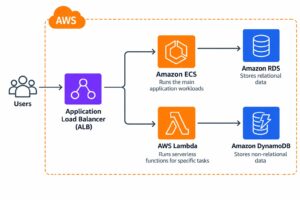
The customer’s infrastructure was running on AWS. They had multiple services like ECS to operate their main workloads. They stored data in RDS and DynamoDB depending on the type of data. They also used some Lambda functions and ALB.
They used Slack as the main tool for internal communication.
The Challenge
The customer’s main challenge was the significant amount of time spent by their support team addressing customer questions. They needed 72 hours of human time daily to answer those questions.
Customers sometimes asked questions for which the answers were already available on the website. For example, answers to many questions were already in the FAQ or had dedicated blog pages.
The average waiting time for the customer was about 7 minutes to get an answer. On top of that, the customer support team needed to spend time answering those questions.
Some questions were much deeper and needed human expertise. Other answers could only be found by checking internal documentation and tools.
They thought the situation could be improved by leveraging AI infrastructure. This could help reduce human labour for customer support. It could also improve response times for questions that were already answered in the website documentation.
They needed two types of AI systems:
- Designed to answer end-user questions using public documentation.
- Designed to answer customer support team questions using public and internal documentation.
Possible Solutions
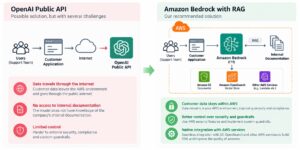
One of the customer’s possible solutions was to use OpenAI’s public API. Though this solution sounded plausible, it had several problems. First and foremost, the data would travel through the internet. Secondly, we needed the AI models to have an understanding of the customer’s internal documentation used to answer the questions. To do so, the ideal solution would be to use RAG.
We offered them an alternative solution using Amazon Bedrock for the AI models. We could also use RAG to access the customer’s documentation and provide better results for customer queries.
The advantages of Amazon Bedrock were:
- Customer data could remain within the AWS environment
- Better control over security and guardrails.
- Native integration with AWS services needed to build the RAG solution and improve the quality of the answers.
Analysis of Possible Solutions
Both internal and public documentation could be stored in the same RAG system. The documents could be chunked and stored together.
The metadata.json files in the S3 bucket could be used for logical isolation. For example, documents could have a “public”: true property. This could be used to search only within public documentation. For internal use, the system could search across both internal and public documentation.
Technically, metadata filtering could be used to separate public and internal documentation. However, this would make the application responsible for always applying the correct filter.
We identified a security concern. A mistake in the code could expose internal information to public customers. This information was intended only for the customer support team. Frequently changing code has that risk and we needed better isolation.
So, we decided to use two separate RAG systems.
So, the decision was made to split the two RAG systems. Public customers would use the RAG system designed for end-user queries. The customer support team would use a separate RAG system containing both public and internal documentation.
The Architecture
As the requirements and security concerns were addressed during the analysis, the underlying architecture became clearer.
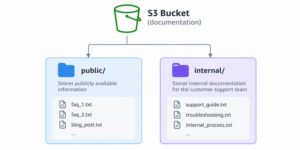
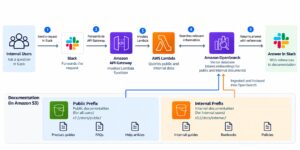
We would have one S3 bucket where both public and internal documentation will be stored. S3 bucket would have two main prefixes public and internal
- public to store publicly available information
- internal to store internal documentation for customer support team
We designed a scraper that would scrape the website and store the information in .txt files. The files contained clean text without HTML and were stored in the public folder. For example, each FAQ question was stored in a separate file. An entire blog post was stored in another .txt file without HTML. This scrapper was an AWS batch job that run daily.
Then, we got access to the internal documentation. It was converted to text files for better chunking and stored in S3 under the internal prefix. We similarly automated the process of updating the internal folder.
Then, we would have two Bedrock Knowledge Bases and two OpenSearch vector databases to store the chunks.
The first Bedrock Knowledge Base would be designed for end users. It would scan only the public prefix.
The second Bedrock Knowledge Base would scan both the public and internal prefixes for the customer support team. As mentioned earlier, the customer support team needed access to both public and internal documentation.
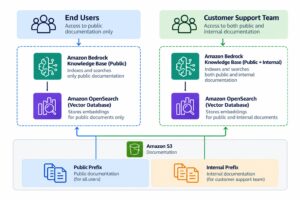
Then, we developed an API Gateway that the website bot app can send a request and it would answer end users’ questions from AI. So, end user architecture looked liked this: Lambda invoked semantics search to find relevant information.
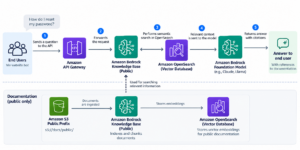
For customer representatives, the architecture was a bit different.
We integrated an AWS Lambda function with Slack. The customer support team used slack to ask questions to get the relevant information to facilitate user queries. The steps were like this.
Internal users send a request through Slack. Slack forwards the request to API Gateway. API Gateway invokes a Lambda function. The Lambda function queries the relevant public and internal data stored in OpenSearch Vector DB.
Overall architecture for that part looks like this:
Results
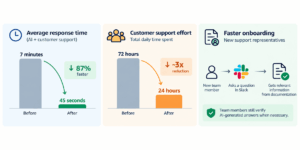
After the implementation, the average response time across both AI and customer support dropped from 7 minutes to just 45 seconds.
The customer support team required only 24 hours of work per day in total, representing an almost 3x reduction in time spent handling customer requests.
Onboarding new customer support representatives also became faster. New team members could quickly ask questions in Slack and retrieve relevant information from the company’s documentation. However, they were still expected to verify AI-generated answers when necessary.
Conclusion
Overall, AI tools cannot fully replace customer support representatives. However, they can significantly reduce manual work. The right architecture and implementation are key to achieving this.
AI can also make onboarding faster. New customer support representatives can quickly access relevant internal knowledge. This helps them find the information they need more efficiently.