
The Control Worked. You Just Can’t Prove It.
Six months into a Type II observation window, an auditor asks for evidence that account-level S3 Block Public Access stayed enabled during week 23. The setting had, in fact, stayed enabled the entire time. Nobody could prove it. GuardDuty’s finding history had already aged past the window the team assumed was permanent. AWS Config showed the resource’s current state, not a clean, exportable record from six months back. The engineer who could have spoken to it from memory had left the company in month four.
This isn’t a rare edge case. First-time SOC 2 audits land a qualified opinion in roughly five to ten percent of cases, and evidence gaps exactly like this one, a control that worked but can’t be proven, are a recurring reason why. Auditors aren’t trying to catch anyone out. Sampling an arbitrary week and asking for proof is standard Type II testing procedure, not a hostile move. The problem sits entirely on the preparation side: most AWS security tooling defaults to showing today’s picture, not a historical one you can hand over on request.
This is the failure mode that actually derails SOC 2 audits on AWS, and it has almost nothing to do with whether the control existed. It comes down to whether the environment can answer a question about a specific point in the past, on demand, without someone reconstructing it by hand from a half-remembered Slack thread. For a company in the middle of a fundraise or an enterprise deal, a qualified opinion over one unprovable control isn’t an abstract compliance problem. It’s a renegotiated closing date.
That’s the actual bar for continuous SOC 2 compliance on AWS. Not a dashboard that reads green today, but a store that can be queried for any week inside the observation period and return a timestamped answer. Most teams build the detection half of this (GuardDuty, Config, Security Hub) and skip the retention and query half entirely. They find the gap the week an auditor asks a specific, time-bound question.
Detection Isn’t the Bottleneck. Retention and Query Are.
AWS’s detective services were never designed around a twelve-month audit window as the default assumption. Each one has its own retention behavior, and none of them line up cleanly with what a Type II report needs.
| Source | Default behavior | Gap for a six-to-twelve month window |
|---|---|---|
| GuardDuty findings | Age out of the console over time unless actively archived | No native long-term store; needs export to S3 or a SIEM |
| CloudTrail (console history) | Ninety-day rolling window in the console | A full trail delivered to S3 solves this, but only if it was configured before the window started |
| AWS Config | Configuration history retained, but console review is manual, one resource at a time | Fine for a single lookup, painful for producing a bulk evidence sample |
| Security Hub findings | Historical trend data now extends up to a year following the service’s late-2025 relaunch | Useful for showing posture over time, not a substitute for raw, queryable event data |
None of these gaps show up in week one. They show up in month seven, exactly when they’re expensive to fix and exactly when a growth-stage team is least staffed to fix them under pressure.
There’s a second, quieter gap underneath the retention one. AWS Config rules can run on two triggers: periodically, on a schedule like every twenty-four hours, or immediately, the moment a resource’s configuration changes. For SOC 2 evidence, change-triggered evaluation matters more than it sounds like it should. A rule checked once a day can miss a violation that opened and closed in an afternoon, and that gap stays invisible in a monthly compliance report even though it happened squarely inside the audit window.
Building the Pipeline With AWS Managed Monitoring
The practical fix is a pipeline, not a single service. Four pieces, built in order.
Detection
GuardDuty, with Extended Threat Detection now covering EC2 and ECS as of AWS’s December 2025 update, correlates activity across compute and container workloads instead of surfacing isolated alerts per signal. Amazon Inspector and Amazon Macie round out vulnerability scanning and data classification, and IAM Access Analyzer adds continuous visibility into resources shared outside the account, all feeding the same correlation layer below.
Correlation
Security Hub, generally available since December 2025, ingests findings from GuardDuty, Inspector, and Security Hub CSPM and correlates them into one near-real-time risk view instead of four separate consoles, as AWS laid out in its general availability announcement on the AWS News Blog. It’s the closest thing AWS ships to a single feed that’s actually useful for compliance risk, though it’s worth being precise about what it isn’t. Security Hub CSPM supports standards like AWS Foundational Security Best Practices, CIS, PCI DSS, and NIST SP 800-171. There’s no native SOC 2 standard in that list. For SOC 2-specific control mapping, AWS Config’s sample conformance pack for SOC 2 is the closer fit: it checks whether CloudTrail is enabled across every region, whether Config recording is turned on, whether MFA is enforced, and whether root account activity is monitored, using specific managed rules like iam-root-access-key-check, encrypted-volumes, and restricted-ssh doing the actual checking underneath the conformance pack label. Treat it as a solid starting template, not an audit-endorsed framework on its own.
Security Hub’s Exposure page is the practical payoff of the correlation work: findings roll up by severity with ninety-day trends and, where relevant, an attack path view showing how a specific misconfiguration connects to a broader risk. For a one- or two-person security function, that’s the difference between triaging forty raw findings a week and triaging the four that actually matter. It’s also worth modeling the cost before flipping every standard on across every account. Security Hub’s post-relaunch pricing is resource-based rather than per-finding, which is friendlier at low finding volumes, but five standards across twenty accounts adds up faster than the console suggests at first glance.
Durable, normalized storage
This is the piece most teams skip, and it’s also the piece AWS just rebuilt. Amazon CloudWatch’s unified data store, launched alongside Security Hub in December 2025, ingests CloudTrail, VPC Flow Logs, WAF logs, and Route 53 resolver logs across an entire AWS Organization, normalizes everything to the Open Cybersecurity Schema Framework, and lands it in Apache Iceberg-compatible S3 Tables at no added storage charge. That’s AWS managed monitoring doing the job a homegrown ETL pipeline used to handle two years ago.
Query
Once data sits in S3 Tables, Athena, Redshift, or SageMaker Unified Studio can query it directly. This is the piece that turns “we believe the control worked” into “here’s the exact record for the week you asked about.”
Worth knowing if your evidence plan currently leans on AWS Audit Manager or CloudTrail Lake for that last piece: both changed status this year. Audit Manager stopped accepting new account or region setups as of April 30, 2026. CloudTrail Lake closed to new customers a month later, with AWS pointing existing users toward CloudWatch for comparable querying capability going forward. Existing setups keep running as-is. A program starting fresh now is better served building directly on the CloudWatch and Security Hub path than standing up a service that’s already moved to maintenance mode.
A 50 to 200 Employee Implementation Pattern
At this size, usually one or two people own security part-time alongside other infrastructure work. The pattern that holds up under audit pressure looks like this.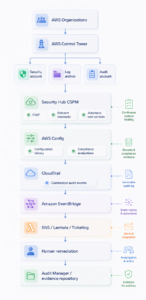
Account structure
A dedicated security tooling account, separate from workload accounts, set as the delegated administrator for GuardDuty, Security Hub, Macie, and Config. Central configuration in Security Hub pushes the same standards to every member account at once, instead of enabling them account by account, which is usually where configuration drift starts at this size. AWS’s own security reference architecture goes a step further and splits this into two accounts: a Log Archive account that holds the actual CloudTrail and Config data with no standing write access for anyone, and a separate Security Tooling account where GuardDuty, Security Hub, and the investigation work live. Keeping them apart means the team running an investigation never has a path to alter the evidence they’re investigating, which is exactly the kind of separation an auditor asks about directly.
Aggregation
A Config aggregator in the security account pulls compliance data from every member account. The SOC 2 conformance pack deploys to all accounts through StackSets or Control Tower, not by hand, one account at a time.
Storage and query
CloudWatch’s unified data store runs at the organization level, ingesting the org trail and VPC Flow Logs from every account. A dedicated Athena workgroup, reachable only through a scoped, read-only IAM role, gives an auditor direct query access during fieldwork instead of a folder full of manual exports. Systems Manager Compliance can feed the same pipeline with patch-level evidence, useful for auditors who ask about vulnerability remediation timelines specifically, not just configuration drift.
Response
EventBridge rules watch for Security Hub findings and Config compliance change events. A typical rule here matches on aws.config as the source and a compliance change as the detail type, filtered down to the specific rules the team has already decided are safe to auto-remediate. For violations with a known, safe fix, like a public S3 bucket or an open security group, a Lambda function remediates automatically and logs the action with a timestamp. Anything that needs judgment opens a ticket instead, assigned to a named owner rather than a team distribution list.
None of this needs to live only in engineering. A monthly rollup, the Security Hub score, the count of Config violations caught and closed, and the average time to remediate, gives a CEO or board a concrete answer to “are we actually compliant” without reading Slack threads or waiting for the annual audit to find out.
Cadence and ownership
Every control has one named owner who reviews it monthly, plus a quarterly access review, since access deprovisioning and access review lapses remain among the most common findings auditors report across first-time SOC 2 programs. On budget, expect the AWS side of this (Security Hub’s resource-based pricing, GuardDuty’s extended detection, CloudWatch ingestion) to land in the low thousands of dollars per month at this scale, separate from audit fees and any GRC platform license layered on top.
Violation From Detection to Closed Evidence
Here’s what the pipeline actually produces, start to finish, for a single incident.
A developer at a 120-person company temporarily disables account-level S3 Block Public Access to push through a manual data export, planning to revert it right after. A meeting pulls them away and they forget.
- Minute 0. The setting changes. AWS Config’s change-triggered evaluation flags the account as non-compliant against the
s3-account-level-public-access-blocksrule. - Minute 2. Security Hub ingests the finding and correlates it against the account’s broader risk posture.
- Minute 4. An EventBridge rule matches the compliance change event and invokes a Lambda function that re-enables Block Public Access and posts the action, with a timestamp, to the team’s ticketing system.
- Minute 12. The ticket closes. Total time from change to remediation: twelve minutes.
Every step of that sequence (the original change, the Config evaluation, the Lambda execution, the ticket closure) lands in CloudWatch’s unified data store as OCSF-normalized events, retained well past the audit window.
Six months later, an auditor samples that exact week. An Athena query against the S3 Tables returns the full sequence: when the setting changed, when it was caught, when it was fixed, and who closed the ticket. That record is stronger evidence than a clean history with no findings at all, because it proves the control actually operates rather than simply existing on paper. A finding caught and closed in twelve minutes tells an auditor the monitoring works. A year with nothing to show either means the environment genuinely never changed, which is rare for any company doing real work, or means nobody was watching closely enough to catch anything at all.
That’s a single query, not a week of screenshot archaeology, and it’s exactly the kind of sample an auditor can ask for cold, on any account, for any week in the observation period, without advance notice changing the answer.
Where This Stack Stops and a GRC Layer Starts
Everything above covers AWS resource configuration. SOC 2’s Trust Services Criteria reach further than infrastructure, and native AWS tooling has no opinion on whether HR ran background checks, whether a vendor risk assessment happened before a new subprocessor touched customer data, or whether employees acknowledged a security policy this year. Change management approvals that happen in a pull request review rather than an AWS API call, incident response tabletop exercises, and annual risk assessments all fall into the same category. AWS can tell you a security group changed. It can’t tell you whether that change went through a second reviewer first.
That’s the actual dividing line for deciding whether a GRC platform like Vanta, Drata, or Secureframe belongs in the stack. If the gap is purely AWS configuration evidence, the pipeline above closes it without another subscription. If the gap includes people and process criteria that live entirely outside AWS, a GRC layer earns its cost by pulling those criteria into the same evidence trail, instead of leaving them in spreadsheets nobody updates until the week before the audit starts. That’s not a hypothetical trade-off either: roughly sixty to seventy percent of first-time SOC 2 programs end up running a GRC platform alongside their cloud tooling, not instead of it, because the people and process criteria never disappear even when the infrastructure evidence is airtight.
A rough rule of thumb: if AWS configuration evidence alone covers most of a company’s Trust Services Criteria, the remaining slice is rarely worth building from scratch. Buy the GRC layer for that last stretch instead of writing custom scripts to track policy acknowledgments in a spreadsheet. Either way, the pipeline built on Security Hub, Config, and CloudWatch stays the foundation. It just determines how much sits on top of it.