
AWS’s Spring 2026 SOC 1, 2, and 3 reports cover 188 services over the twelve months ending March 31, 2026. That report, downloadable from AWS Artifact, tells your auditor and your customers that AWS’s data centers, hypervisor, and managed service operations are sound. It says nothing about your IAM policies, your S3 bucket settings, or whether MFA is enforced on the account that has admin access to your production database. That part is entirely yours under the shared responsibility model, and it’s the part your own auditor will actually test.
AWS Audit Manager’s prebuilt SOC 2 framework maps 61 controls across the Trust Services Criteria, 15 automated and 46 manual. Most of those 46 manual controls are policy, HR, and governance work that sits outside AWS entirely: offboarding procedures, vendor contracts, board oversight documentation. The 18 below are the ones that live inside your AWS account, the ones an engineer can open a console and verify without waiting on legal or HR to produce a document. Work through them in order, and you’ve cleared the technical layer before your auditor asks for evidence of anything else.
The 18 Controls
| # | Control | Category |
|---|---|---|
| 1 | MFA enforced on root and every human user | Identity and Access |
| 2 | No long-lived access keys for humans | Identity and Access |
| 3 | Least-privilege IAM policies, no wildcard admin grants | Identity and Access |
| 4 | Access reviews on a fixed cadence, tied to offboarding | Identity and Access |
| 5 | CloudTrail multi-region trail, log file validation on | Logging and Detection |
| 6 | AWS Config recorder enabled, rules mapped to Audit Manager | Logging and Detection |
| 7 | VPC Flow Logs enabled on production VPCs | Logging and Detection |
| 8 | Security Hub correlating GuardDuty, Inspector, Macie, and CSPM | Logging and Detection |
| 9 | S3 Block Public Access at the account or org level | Network Exposure |
| 10 | Security groups audited for open SSH, RDP, and database ports | Network Exposure |
| 11 | Encryption at rest via KMS CMKs on RDS, S3, EBS, DynamoDB | Data Protection |
| 12 | Encryption in transit enforced on load balancers and APIs | Data Protection |
| 13 | Macie enabled on S3 buckets holding regulated data | Data Protection |
| 14 | Infrastructure as code with PR review, no direct console changes to prod | Change and Vulnerability Management |
| 15 | Vulnerability scanning with a documented, severity-based patch SLA | Change and Vulnerability Management |
| 16 | Incident response runbook tested inside the audit window | Incident Response and Continuity |
| 17 | AWS Backup policies with RPO/RTO defined, restore tested | Incident Response and Continuity |
| 18 | Vendor and sub-processor tracking, including AWS’s own SOC 2 report | Incident Response and Continuity |
Some of these you can verify from a laptop in an afternoon. An MFA check or a bucket policy review doesn’t take much. Others, encryption architecture decisions spread across a dozen services, or an IAM policy structure that’s grown organically for three years, take longer to untangle than a pre-audit sprint allows. That’s usually the point a growth-stage team brings in a SOC 2 AWS compliance partner rather than reverse-engineering six months of evidence from scratch. Here’s what to check and how, category by category.
Identity and Access
This group carries more audit risk than any other category on this list, mostly because the controls below are tested over time, not verified once and forgotten.
MFA enforced on root and every human user. Root MFA is table stakes and gets checked first. The more common gap sits with human IAM Identity Center users who have console access but no MFA requirement enforced at the permission set level. Verify enforcement through an IAM credential report, not a policy document that says MFA is required.
No long-lived access keys for humans. Static access keys sitting in a laptop’s .aws/credentials file are the thing every auditor asks about in the first interview. Move human access to IAM Identity Center with temporary, auto-expiring credentials, and run IAM Access Analyzer’s unused access findings to catch any keys that still exist.
Least-privilege IAM policies, no wildcard admin grants. A policy with "Action": "*" and "Resource": "*" attached to more than a handful of break-glass roles is a design deficiency an auditor will document on sight. Run IAM Access Analyzer’s policy validation against every role and clean up what it flags before the audit window opens, not during it.
Access reviews on a fixed cadence, tied to offboarding. This is a process control, not a technical one, and it fails more often than anything else on this list. Access deprovisioning shows up as an audit finding in 30 to 40 percent of engagements, and access reviews sit close behind at 25 to 35 percent. Set a quarterly review cadence, log who reviewed what, and connect offboarding in your HR system to IAM deprovisioning so a departure and a permissions removal happen in the same week, not the same quarter.
Logging and Detection
Every other category on this list depends on evidence generated here. If detection and logging aren’t in place first, nothing downstream is verifiable.
CloudTrail multi-region trail with log file validation on. Single-region trails are the most common “we thought we had this” gap. Deliver the trail to a dedicated logging account with a bucket policy that blocks the workload account from modifying or deleting it.
AWS Config recorder enabled, rules mapped to your Audit Manager data sources. Config isn’t optional infrastructure here, it’s the dependency both Audit Manager and Security Hub’s posture checks run on top of. Confirm the recorder covers every resource type in scope, not just EC2 and S3.
VPC Flow Logs enabled on production VPCs. You can’t answer “who talked to what” during an incident without this, and it’s exactly the question an auditor asks when testing your detection controls. Set retention to match your observation window instead of the default 30 days.
Security Hub correlating GuardDuty, Inspector, Macie, and Security Hub CSPM. AWS re-launched Security Hub in December 2025 with near real-time risk analytics that automatically aggregate and correlate findings across those four sources, instead of leaving you to check four separate consoles during an incident. Turn it on from a delegated administrator account with cross-region aggregation, and route findings above a severity threshold into whatever ticketing system your team actually uses. A correlated dashboard nobody opens still isn’t a control an auditor will accept.
Network Exposure
Security Hub CSPM’s default standards catch both of the checks below automatically now. The check flags the problem; a person still has to fix it.
S3 Block Public Access enabled at the account or org level. Turn this on once, at the organization level, instead of managing it bucket by bucket. Confirm there are no exceptions through IAM Access Analyzer’s external access findings, not by scrolling the console.
Security groups audited for open access on SSH, RDP, and database ports. A 0.0.0.0/0 rule on port 22 is rarely added on purpose. It’s usually left over from a bastion host two reorgs ago that nobody remembered to clean up.
Data Protection
Encryption gaps are rarely about a feature never getting turned on. They’re about which resources got missed when the feature was turned on for everything else.
Encryption at rest via KMS customer managed keys on RDS, S3, EBS, and DynamoDB. Default AWS-managed keys satisfy a vulnerability scanner. They don’t satisfy a Type II confidentiality test that wants to see key rotation and access logging tied to a specific key you control. Move regulated data stores to CMKs before the observation period starts, not during it.
Encryption in transit enforced across load balancers and APIs. Check the TLS policy on every ALB listener, CloudFront distribution, and API Gateway stage. A self-signed or expired certificate on an internal-only endpoint is a classic gap, because nobody notices until an auditor’s scan does.
Macie enabled on S3 buckets holding customer or regulated data. “We know where our PII lives” is a claim auditors test, not one they take on faith. Macie’s automated sensitive data discovery runs continuously against your S3 estate, which matters because manual tagging drifts the moment someone spins up a new bucket for a one-off export.
Change and Vulnerability Management
Infrastructure as code with PR review gates, no direct console changes to production. This is where infrastructure as code for compliance stops being a developer preference and starts being an audit control. Config drift detection is how an auditor, and you, catch a console change that bypassed the PR process, so the two need to work together, not one instead of the other.
Vulnerability scanning with a documented, severity-based patch SLA. Run Inspector across EC2, ECR, and Lambda, and gate your CI pipeline on container and dependency scan results so a critical CVE never reaches a deploy in the first place. Vulnerability exploitation overtook credential abuse as the leading breach entry point in 2026, climbing to 31 percent of breaches from 20 percent the year before. That’s exactly why auditors now ask for your patch SLA and evidence you hit it, not just confirmation that a scanning tool exists somewhere.
Incident Response and Continuity
These are the controls nobody tests until they actually need them, which is precisely why an auditor wants to see that you tested them anyway.
Incident response runbook tested at least once inside the audit window. A written plan that’s never been run is a design control, not an operating one, and Type II tests operation. Run a tabletop exercise against something concrete, a compromised IAM key for example, and keep dated evidence that it happened.
AWS Backup policies with RPO and RTO defined per data store, restore tested. “We have backups” without a tested restore is the second most common surprise in a first-time audit. Run the restore, time it against your stated RTO, and keep the record.
Vendor and sub-processor tracking, including how you consume AWS’s own SOC 2 report. Pull the AWS SOC 2 report from AWS Artifact and map the Complementary User Entity Controls it assumes you’re running against the 18 items on this list. This is the control engineers skip because it feels like paperwork, and it’s exactly where auditors probe, because it’s the seam between what AWS attests to and what you’re responsible for proving yourself.
Passing This Checklist Is Not the Same As Passing Your Audit
Every control above is verifiable in an AWS console, most of them in an afternoon. That’s exactly why teams get the sequencing wrong.
The counterintuitive part: AWS security hardening gets you through a technical review, not a SOC 2 Type II audit. A Type II report validates that controls operated effectively over a continuous observation period, typically six to twelve months, not that they were configured correctly on the day someone checked. Running through this checklist once, two weeks before your auditor’s kickoff call, produces a system that looks compliant and an evidence trail that proves nothing about the ten months before that.
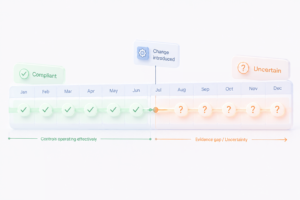
The eight control exceptions that account for roughly 70 percent of material findings in SOC 2 audits are almost never “we never configured MFA.” They’re closer to “MFA was enforced from March through June, then someone added a new IAM Identity Center permission set in July without it.” The gap wasn’t a missing control, it was four months of missing evidence that the control kept operating after the person who set it up moved to a different project.
The most common mistake we see: engaging an auditor before these controls are actually operational, which starts the observation clock too early and locks in the exact gaps you were still fixing. Work through this checklist first, let the review cadences run for a full quarter, and only then start the clock.
When the Report Doesn’t Match What You Actually Sold
Even a clean audit opinion can fail to do what you needed it to do, and this is where growing companies lose the most time.
Security is required in every SOC 2 report and covers 33 common criteria across nine categories, but most first-time audits scope to Security alone. That’s the right call for a company selling to other startups. It’s the wrong call the moment a healthcare or fintech prospect’s security questionnaire asks specifically about Availability or Confidentiality, and you find out mid-deal that your report doesn’t cover what their vendor risk team requires.
The same mismatch shows up with report type. Regulated buyers, healthcare systems in particular, rarely accept a point-in-time Type I report, but plenty of growth-stage companies still rush a Type I to close a specific deal, then discover the next enterprise prospect’s procurement team won’t move forward without a Type II observation period behind it. Scoping this correctly on day one, against the deals you’re actually trying to close in the next twelve months rather than the audit that’s fastest to obtain, is worth more than any single control on the technical list above.