

In this article, we will take a look at how to set up a RAG implementation on AWS with real examples and a sample code repository.
First things first, here is the code repository: https://github.com/aland-cloud/aws-bedrock-opensearch-rag
Now, we will deep dive into the code, explain what each module does and show how you can further expand the codebase.
Infrastructure as Code with AWS CDK
To make every piece of infrastructure reproducible, we use infrastructure as code (IaC). For this project, we chose AWS CDK, which is well-integrated with the AWS ecosystem.
Other IaC tools like Terraform would work too, but a RAG setup usually involves multiple Lambda functions, IAM roles and an OpenSearch domain, and CDK makes wiring these together simpler, since you define the infrastructure in the same language as your application code.
How to deploy the project
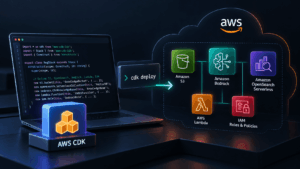
If you haven’t yet installed AWS CDK and AWS CLI, you should do that first. Once you have them, you should authenticate with your AWS account from CLI, whether using IAM user secrets or SSO, whatever setup you have. AWS CDK will create the resources in the AWS account where your CLI is authenticated.
To start, first execute the command, npm install to install dependencies. Once it is done, you can go forward and deploy the code by running: npx cdk deploy –all
It takes around 3-5 minutes to create all resources, so just don’t interrupt the process.
We will talk about each resource that was created and what it does later in the article.
How to destroy the project
IaC is good at creating resources, but it is also an excellent tool to destroy them. The good point is that, as we used AWS CDK to create the resources, we can delete all of them together when we are done with the demo or project, which keeps the cost down and AWS environment clean.
For example, even if you know that high the cost driver is OpenSearch Serverless and you delete it manually, the other resources like roles, S3 buckets, lambda functions will remain in the AWS accounting, creating an extra noise that will become hard to maintain over time.
That’s why IaC tools give us a power to delete all of them together. Long story short, you can delete all the resources created by this project by simply running: npx cdk destroy –all
What resources are created and why
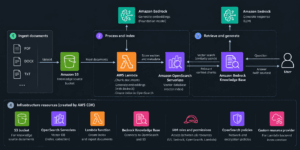
The AWS CDK stack creates several resources, but the most important ones are
- S3 bucket for knowledge source
- OpenSearch Serverless for vector DB
- Lambda function to create index on Vector DB
- Bedrock Knowledge Base
- IAM Roles and permissions
- IAM role for bedrock knowledge base with S3 read policies
- OpenSearch Serverless network and encryption policies
- A customer resource provider for the lambda backend index creation
S3 bucket
The created S3 bucket will serve as the source for our data. We upload the knowledge there, and it gets ingested in chunks into the OpenSearch Serverless vector DB.
You can upload PDF files, JSON or whatever format you need. Please note, once you upload a file, it won’t be ingested automatically.
You should trigger the sync. For this example, take any PDF that you want to serve as a knowledge base for your AI and upload it to the S3 bucket.
OpenSearch Serverless
OpenSearch Serverless is the critical part of this infrastructure. It serves as a vector db. It stores the embeddings and finds the relevant chunks when queried.
It is also the most expensive resource in RAG infrastructure and depending on your load this can scale. Even if it is idle, it still occurs expense. In this example, we used Serverless for simplicity, but you can also use pre-defined provisioned OpenSearch service.
Bedrock Knowledge Base
Another critical piece of this infrastructure is AWS Bedrock Knowledge Base. When you add files to your S3 bucket, the knowledge base handles the ingestion: splits the files into chunks, converts them into embeddings and stores them into OpenSearch.
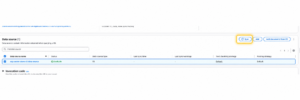
It doesn’t do it automatically. Once data is on S3 bucket, you need to trigger a sync. Sync can be triggered via console, CLI or API/SDK. Sync usually takes some time depending on the amount of data it needs to sync.
Sync is incremental, meaning that, if you add new files, only them will be embedded while old files were already embedded. Sync usually occurs costs depending on the amount of data it chunks and embeds.
In this example, we have used: Cohere Embed Multilingual v2 as an embedding model, but AWS offers multiple embedding models and you can choose them depending on your requirements. For example, Amazon Titan Text Embeddings V2 model is more affordable. When cost matters the most, you can choose that model.
Bedrock comes with built-in chunking strategies, but you can also implement your own chunking logic by attaching a Lambda function that runs during ingestion.
After Sync
Once the sync is complete, you’re ready to query the data. To generate answers, you also need to choose a foundation model, such as Anthropic’s Claude models or Amazon’s own Nova models.
Bedrock offers two ways to query a Knowledge Base:
Retrieve and generate: Bedrock fetches the most relevant chunks from OpenSearch and passes them to the model, which returns a complete answer, optionally with citations to the source documents.
Retrieve only: Bedrock returns just the relevant chunks, so you can pass them to a model yourself and keep full control over the prompt.
You can query the Knowledge Base through the console, the CLI, or the API/SDK. The console and CLI are great for testing, but your production application will typically use the SDK.
How to Expand the Codebase
The code given here is just an example that you can build your own RAG or agentic system on.
Let’s take a look at some of the ways you may need to expand this codebase to make it production-grade.
Environments
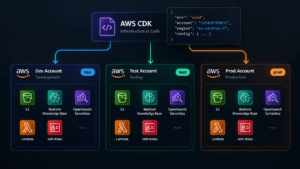
You may need multiple environments, such as testing and production. As a general rule, I recommend creating a separate AWS account for each environment. You can then use the same stack to deploy to both environments, though you may need to add tags and environment variables for each account.
Ideally, you should avoid if-else conditions based on the environment. Instead, try to structure the code so that each environment simply uses different parameters.
For example, the bucket name in this case doesn’t depend on the environment, since it uses the account ID to make it unique. But you can customize your resource names.
You can have config data and for each environment provide their own key-value pairs based on which resources names, sizes will be created.
Adding functionality
Whether you need Lambda functions, an API Gateway, or other infrastructure pieces, you can expand the existing codebase and add the new functionality from there.
CI/CD
You should automate deployments to your test and prod environments. One thing to keep in mind: whatever CI/CD tool you use, such as GitHub Actions or CircleCI, make sure to use OIDC authentication rather than an IAM user with access keys.
It’s more secure and easier to maintain. You can also use the AWS CDK deploy command in your pipeline to release new changes to both infrastructure and code.
Conclusion
This article included sample code that can be expanded to build AWS infrastructure for AI pipelines or your own agentic system. It still needs to be expanded but it can serve as a solid starting point: proper IaC that works and creates resources that required to start any RAG system, with least-privilege permissions.