

Not only is HIPAA compliance certification, but it is also an architecture.
If you are a CTO or Head of Engineering at a growth stage healthcare company, you have probably already signed AWS’s Business Associate Addendum. You may have checked that box during your first architecture review and moved on. Here is the uncomfortable truth: signing a BAA with AWS does not make your product HIPAA compliant. It makes AWS willing to be held to HIPAA’s standards for the infrastructure it operates. Everything above that layer, how you architect your VPCs, which services touch protected health information, how you log access, how you prove any of it later, is still entirely your responsibility.
Enterprise healthtech buyers and their security teams no longer accept a signed BAA as proof of anything. During vendor security review, they ask for architecture diagrams. They ask which AWS services process PHI and whether each one is actually eligible to do so. They ask for evidence, not assurances. A due diligence process that used to be a checkbox exercise has become a technical interrogation, and teams that treated HIPAA compliance on AWS as paperwork are the ones who get stuck mid deal scrambling to answer questions they should have been able to answer in an hour.
HIPAA compliance on AWS works when it is designed into the infrastructure from the start, not layered on top after a customer asks for it. Whether you build everything internally or work with an AWS managed services partner specializing in healthtech, the underlying principle is the same: compliance needs to be engineered into the platform from day one, not retrofitted after an enterprise customer requests evidence.
Why Most AWS Environments Aren’t HIPAA Ready by Default
The shared responsibility model is the single most misunderstood concept in cloud compliance, and HIPAA makes the stakes of that misunderstanding higher than almost anywhere else. AWS is responsible for the security of the cloud: the physical data centers, the hardware, the network infrastructure, the hypervisor layer. You are responsible for security in the cloud: how you configure the services you use, how PHI flows between them, who can access it, and whether that access is logged in a way you can later prove.
Teams often read “AWS is HIPAA compliant” and stop there. AWS is not compliant in any meaningful sense on its own. It offers a set of services that can be configured to support a HIPAA compliant workload, and it will sign a BAA covering those services. Whether your specific deployment of those services actually protects PHI is a question only your architecture can answer.
In practice, the gaps show up in predictable places. PHI ends up touching a service that was never covered by the BAA because nobody checked eligibility before wiring it into the pipeline. EBS volumes get created without encryption enabled, often because the default in an older AWS account or an unreviewed Terraform module simply never turned it on. S3 buckets go live without default encryption or without a bucket policy blocking public access. CloudTrail gets enabled in one region during initial setup and never extended account wide, leaving blind spots in exactly the kind of activity an auditor will ask about. IAM roles accumulate standing access to PHI data stores because it was easier to grant broad permissions during a sprint than to scope them properly and revisit later.
One scenario shows up often enough to be worth naming directly: a Lambda function that logs full request payloads to CloudWatch for debugging, and those payloads happen to include patient data. Lambda itself is a HIPAA eligible service. CloudWatch Logs, depending on configuration and what is written into it, can quietly become the place where PHI ends up sitting in plaintext, outside any access control designed for it. The service was eligible. The way it was used was not.
What “HIPAA Eligible” Actually Means on AWS
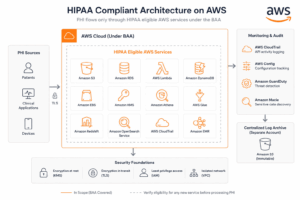
AWS maintains a specific, published list of services that are covered under its Business Associate Addendum: the services you are permitted to use to store, process, or transmit PHI while remaining within the boundary of that agreement. This list includes core services like S3, RDS, EC2, Lambda, DynamoDB, KMS along with a growing set of others as AWS extends BAA coverage over time. Any service not on that list is, by default, off limits for PHI, regardless of how secure it seems or how well it is configured.
The practical implication is that your architecture diagram should make it immediately obvious which services touch PHI, and every single one of those services needs to be confirmed against AWS’s current eligible services list. This is not a one time check. AWS updates the list periodically, and your own architecture changes constantly as you ship new features.
The most common failure mode here happens mid build, not at initial design. A team adds a managed queue to decouple two services, or drops in a search index to power a new feature, or wires up a third party analytics tool for product insights, all without pausing to check whether PHI is going to flow through it and whether that service is actually covered by the BAA. By the time anyone notices, the service has been in production for months and PHI has been moving through an uncovered boundary the entire time. The fix is procedural as much as technical: eligibility checks need to be part of your service adoption process, not an afterthought during a security review.
Turning HIPAA’s Administrative, Physical, and Technical Safeguards Into AWS Controls
HIPAA’s Security Rule organizes its requirements into three categories of safeguards, and most compliance content stops at describing them in the abstract. The more useful exercise is mapping each safeguard to a specific AWS control you can actually implement and point to.
On the technical safeguards side, access control maps to IAM policies and permission boundaries, with AWS Access Analyzer helping surface unintended access paths before they become a problem. Audit controls map to CloudTrail for API level logging and AWS Config for tracking configuration state and change history over time. Integrity controls, which require that PHI not be improperly altered or destroyed, map to S3 Object Lock and versioning, giving you an immutable, recoverable record. Transmission security maps to TLS enforcement across every network hop, combined with VPC design that keeps PHI carrying resources out of public subnets entirely.
On the administrative safeguards side, the required periodic risk analysis maps to AWS Config conformance packs and Security Hub findings, which turn a manual audit exercise into something closer to continuous monitoring. Workforce access management maps to IAM permission boundaries and regular least privilege reviews, ideally automated rather than dependent on someone remembering to run them quarterly.
| HIPAA Safeguard | Requirement | AWS Control | Service |
|---|---|---|---|
| Technical, Access Control | Restrict PHI access to authorized users | IAM policies, permission boundaries | IAM, Access Analyzer |
| Technical, Audit Controls | Record and examine system activity | API and configuration logging | CloudTrail, AWS Config |
| Technical, Integrity | Prevent improper alteration or destruction of PHI | Immutable, versioned storage | S3 Object Lock, S3 Versioning |
| Technical, Transmission Security | Protect PHI in transit | Enforced encryption in transit | TLS, VPC design |
| Administrative, Risk Analysis | Conduct periodic risk assessment | Continuous configuration and posture checks | AWS Config, Security Hub |
| Administrative, Workforce Access | Limit access based on role | Least privilege enforcement and review | IAM permission boundaries |
This is also where GuardDuty, Macie, and Security Hub earn their place, not as items on a checklist but as the detection and evidence layer sitting underneath all of the above. GuardDuty watches for anomalous behavior across your accounts. Macie identifies where sensitive data, including PHI, actually lives, which is often more revealing than teams expect. Security Hub aggregates findings from across these services into a single view that maps reasonably well to the safeguards an auditor will ask about.
What Auditors and Enterprise Buyers Actually Look For
Building reasonable controls and being able to prove they exist are two different problems, and the gap between them is where most teams get caught out. A team that has genuinely implemented strong access controls but cannot produce a clean record of who accessed what PHI and when is, from an auditor’s perspective, functionally indistinguishable from a team that never implemented those controls at all.
This pattern is nearly identical to what happens with SOC 2 compliance on AWS, where teams have started treating the framework as a sales blocker to clear rather than an architecture requirement to build toward. The same thing happens with HIPAA. Both get treated as a hurdle to pass before a deal closes, rather than a standing property of how the infrastructure works.
The specific failure points that show up during real audits and enterprise security reviews are consistent. Log retention periods are inconsistent across services, or logs exist but nobody can quickly answer how long they are kept or where. There is no documented incident response process, or one exists but has never been tested. Access reviews happen, but only on paper, disconnected from any evidence trail in AWS Config that would let someone verify they actually occurred. Encryption is claimed across the board but cannot be verified service by service when someone asks for proof.
The fix is continuous evidence collection rather than a quarterly scramble before a review. AWS Config rules can continuously check configuration state against your required baseline and flag drift as it happens. Security Hub can maintain a running record of findings rather than a snapshot taken once a quarter. When a buyer or an auditor asks a specific question, the answer should already exist somewhere queryable, not require someone to reconstruct it under time pressure.
Designing Infrastructure Where Compliance Is the Default, Not an Exception
The teams that struggle most with HIPAA compliance are the ones who plan to add controls after the audit request comes in. By the time that request arrives, retrofitting account structure, encryption, and logging into a live production system carrying real patient data is significantly harder and riskier than building it correctly from the start.
Account separation by environment is one of the clearest patterns for making access provable rather than just claimed. Production workloads that handle PHI should sit in accounts isolated from staging and development, with access boundaries enforced at the account level rather than relying on application logic or naming conventions inside a shared account. When an auditor asks how you prevent a developer testing a new feature from accidentally touching production PHI, “it’s a separate AWS account with separate IAM roles” is a much stronger answer than “we have policies about that.”
Encryption at rest and in transit should be a default property of the environment, not a decision made service by service as each resource gets created. KMS customer managed keys give you control over key rotation and access policy in a way that AWS managed keys do not, and enforcing their use across S3, RDS, and EBS by default removes the possibility of someone forgetting to turn encryption on for a new resource. TLS enforcement at both the load balancer and the application layer closes the gap that shows up when encryption in transit is assumed to be handled somewhere else in the stack.
A centralized logging pipeline ties the rest of this together. An organization wide CloudTrail trail, VPC Flow Logs across every relevant VPC, and a dedicated log archive account separate from your workload accounts give you a single, tamper resistant place to point to when someone asks how you monitor access to PHI. This pattern overlaps significantly with what a well built SOC 2 environment looks like, since account separation and evidence pipelines are the backbone of both frameworks.
Where to Start: A Practical Next Step
Here is a question worth asking yourself honestly. If an auditor asked you tomorrow to prove that every service touching PHI in your environment is HIPAA eligible, and that every access event is logged and retrievable, could you answer in an hour, or would it take you a week of digging through consoles and asking around the team?
Most teams don’t find out the answer until a deal is already on the line. A HIPAA architecture review changes that: we map your environment against the safeguards in this guide, flag exactly where the gaps are, and hand you a prioritized list of what to fix before an auditor or an enterprise buyer finds it first. Book a HIPAA architecture review.