

Here is a pattern that repeats. A team signs the AWS BAA, deploys the product into the account they already have, turns on encryption, and passes the first enterprise security questionnaire. Eight months later, a hospital customer’s auditor asks one question: which buckets, databases, and log groups hold ePHI?
Nobody can answer from the console. The environment was never broken. It was unprovable.
That is the real problem behind HIPAA on AWS. Picking HIPAA AWS architecture services is the easy part, because AWS publishes the list. The hard part is making a handful of structural decisions in the right order, because some of them cost an afternoon on day one and a migration project on day 400.
This guide walks through those decisions for CEOs and CTOs who handle electronic patient data and want to know what to demand from their engineering team before anyone writes more Terraform.
The Architecture at a Glance
| Layer | The decision | HIPAA Security Rule reference | AWS services involved |
|---|---|---|---|
| Account structure | Isolate ePHI in dedicated accounts | 164.308(a)(1) risk management, scoping | AWS Organizations, Control Tower |
| Identity | Federated, MFA enforced, no long lived keys | 164.312(a)(1) access control, 164.312(d) authentication | IAM Identity Center, SCPs |
| Network | Private by default, TLS in transit | 164.312(e)(1) transmission security | VPC, PrivateLink, ALB |
| Encryption | Customer managed keys per data domain | 164.312(a)(2)(iv) encryption | AWS KMS, S3, RDS, EBS |
| Logging | Immutable, centralized, separate account | 164.312(b) audit controls | CloudTrail, Config, S3 Object Lock |
| Detection | Org wide findings in one place | 164.308(a)(1)(ii)(D) activity review | GuardDuty, Security Hub, Macie, Inspector |
| Automation | Everything in code, drift detected | 164.308(a)(8) evaluation, 164.316 documentation | Terraform or CDK, Config conformance packs |
| Recovery | Isolated, tested backups | 164.308(a)(7) contingency plan | AWS Backup, Vault Lock |
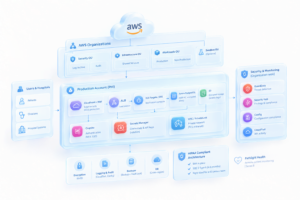
The BAA Covers Less Than You Think
You accept the AWS Business Associate Addendum yourself, through AWS Artifact, and it applies to the accounts you designate. It does not make your workload compliant. AWS says so directly on its HIPAA Eligible Services Reference: you can store, process, or transmit ePHI only on listed services, and you remain responsible for configuring them to meet HIPAA. AWS last updated that list on September 3, 2026.
Two consequences matter for architecture.
The list moves. AWS adds services regularly, including AI services in 2026, so a service that was off limits when you built your environment may be eligible now. The opposite risk is the one that hurts: a developer enables a service that never made the list, ePHI flows through it for months, and nobody notices. A wiki page that says “only use eligible services” will not stop that. A service control policy will.
Eligible does not mean configured. An eligible service with default settings is still your problem. AWS’s June 2026 Industries Blog post on HIPAA ready generative AI architecture makes this explicit by mapping each architectural layer to a specific Security Rule citation, from transmission security at the edge to activity review through GuardDuty and Security Hub. Treat that mapping habit as the standard. If you cannot say which control satisfies which citation, you have a pile of services, not an architecture.
| Layer | AWS owns | You own |
|---|---|---|
| Physical and hypervisor | Data centers, host patching | Nothing |
| Managed service internals | Database engine patching on RDS | Engine version choice, parameter groups |
| Service configuration | Capability to encrypt, log, restrict | Turning it on, key policies, bucket policies |
| Data | Nothing | Classification, retention, minimization |
| Access | IAM mechanism | Who gets in, MFA, review cadence |
Draw the PHI Boundary Before You Draw the VPC
The first structural decision is where ePHI is allowed to exist. Most teams answer that with a VPC. The better answer is an account.
An AWS account is the strongest isolation boundary you get. IAM policies, quotas, billing, and blast radius all stop at the account line. When your auditor asks which resources hold ePHI, “everything in these two accounts, and nothing anywhere else” is a short answer. “Probably these subnets plus a few buckets” is a long and risky one.
Your AWS security architecture should start with a structure like this:
| Account | Purpose | ePHI allowed? |
|---|---|---|
| Management | Organizations, billing only | No |
| Log Archive | Immutable CloudTrail and Config storage | No ePHI, but holds audit evidence |
| Security Tooling | GuardDuty, Security Hub, Macie delegated admin | No |
| Shared Services | CI/CD runners, artifact registries | No |
| Non prod | Development and staging with synthetic data | No |
| PHI prod | Production workloads and databases | Yes |
AWS documents this path for healthcare. Its Landing Zone Accelerator for Healthcare builds on Control Tower and deploys the Operational Best Practices for HIPAA Security conformance pack, plus Security Hub standards for AWS Foundational Security Best Practices and the CIS AWS Foundations Benchmark, across more than 35 services. Start there if you want a reviewed baseline.
Know where it stops. The accelerator does not know your data flows, your application roles, your key design, or which of your services touch ePHI. It gives you the building. You still decide who gets keys.
The mistake I see most often: letting real data into the non prod account “just to reproduce a bug.” One database snapshot restored into staging and your ePHI scope doubles. Staging gets synthetic data, enforced by an SCP that denies cross account snapshot sharing from the PHI account to anywhere else.
Identity Is the Real Perimeter
Attackers who reach ePHI in the cloud rarely break encryption. They use credentials. Build identity first.
- Federate everything. Use IAM Identity Center connected to your corporate identity provider. No IAM users for humans. Sessions expire on their own.
- Enforce MFA at the identity provider, with phishing resistant methods where you can. The current Security Rule treats this as addressable. The proposed rewrite would require it. Building it now costs nothing extra.
- Design break glass access on purpose. One tightly scoped role, alarmed on every use, reviewed after every use.
- Use SCPs as the layer developers cannot override. Even an administrator in the PHI account cannot do what the SCP denies.
A starting SCP for the PHI organizational unit blocks the actions an attacker or a tired engineer would use to hide:
{
  "Effect": "Deny",
  "Action": [
    "cloudtrail:StopLogging",
    "cloudtrail:DeleteTrail",
    "config:StopConfigurationRecorder",
    "config:DeleteConfigurationRecorder",
    "guardduty:DeleteDetector"
  ],
  "Resource": "*"
}
Add an allow list of eligible services for the PHI OU and a region restriction using the aws:RequestedRegion condition. Keep both lists in version control, so a change to eligibility becomes a reviewed pull request instead of a console edit.
The counterintuitive part: your riskiest identity is probably not a person. It is the CI/CD pipeline role that can deploy into production. Federate it with OIDC so no static access keys exist, scope it to specific repositories and branches, and treat its permissions as seriously as a database administrator’s.
Network and Encryption Choices That Hurt to Reverse
Most network and encryption decisions can be changed later. A few cannot, at least not cheaply. This table separates them.
| Decision | At launch | Retrofit later |
|---|---|---|
| Encryption at rest on RDS | One checkbox | Snapshot, encrypted copy, restore, cutover, and downtime. You cannot encrypt a running unencrypted instance in place. |
| Customer managed KMS keys per data domain | An hour of design | Re-encrypting existing objects and volumes under new keys, plus every dependent policy rewritten |
| ePHI in dedicated accounts | A Control Tower account vend | Migrating live data and rewriting cross account IAM |
| Private subnets and VPC endpoints for data stores | Routine design | Route changes on live traffic with regression testing |
| Centralized, immutable logging | Day one configuration | Impossible. You cannot record events that already happened. |
The last row is the one executives underestimate. Logging is the only control that cannot be applied retroactively.
Use customer managed keys, not AWS managed keys, for ePHI. AWS managed keys encrypt your data too, but you cannot edit their key policies or disable them. Customer managed keys give you separation of duties (key administrators who cannot decrypt, workloads that can decrypt but cannot administer) and a CloudTrail record of every use. That record is audit evidence you get for free.
Keep data stores in private subnets with no route to an internet gateway, reach AWS services through VPC endpoints and PrivateLink, and terminate TLS at the load balancer with a policy that rejects old protocol versions.
Logging That Produces Evidence, Not Just Alerts
An alert tells you something happened. Evidence proves what was true on a given date. HIPAA needs both, and teams usually build only the first.
The pattern that works:
- An organization CloudTrail writes to a bucket in the Log Archive account with S3 Object Lock and log file validation enabled.
- AWS Config records configuration changes in every account.
- VPC Flow Logs cover subnets that hold ePHI.
- GuardDuty, Security Hub, Macie, and Inspector run with a delegated administrator in the Security Tooling account, so findings from every account land in one place. Security Hub then gives you a single list during an incident instead of four consoles.
Plan for evidence collection without AWS Audit Manager. AWS closed it to new customers on April 30, 2026, so a design that assumed it needs a replacement. Config conformance pack results plus Security Hub findings, exported on a schedule, cover the same ground.
The leak to watch for: ePHI in application logs. A debug statement that prints a request body writes patient data into CloudWatch Logs, which creates a second copy that nobody classified. Enable CloudWatch Logs data protection policies to mask known patterns, and run Macie against log buckets, not only data buckets.
On retention, HIPAA requires you to keep required documentation for six years under 164.316. Many teams apply the same window to audit logs. Confirm the exact period with your compliance counsel, then encode it in S3 lifecycle rules so nobody enforces it by memory.
Why Infrastructure Automation Decides Whether You Stay Compliant
Everything above can be built by hand in a week. It will not stay built. Someone opens a security group during an outage and forgets to close it. A new hire creates a bucket in the console. Six months later your environment no longer matches your policy documents, and your policy documents are what the auditor reads.
AWS infrastructure automation fixes that by making the code the source of truth.
Put every PHI resource in code. Terraform or CDK, applied through a pipeline, with pull request review. A merged PR with required approvers is a timestamped change record, which is stronger evidence than a change ticket someone filled out afterward.
Automate account creation. AWS’s September 2026 Security Blog post on secure landing zones describes Account Factory for Terraform, where pipelines create accounts through Control Tower, apply baseline guardrails, and register organizational units, so accounts exist as code. Each new PHI account then arrives with the same logging, guardrails, and detectors as the last one.
Deploy the HIPAA conformance pack and read its parameters. AWS ships an official AWS Config conformance pack for HIPAA Security. Deploying it as shipped is a mistake. Many rules take parameters, and the defaults reflect AWS’s general guidance, not your policy. Review each against your own written standards, then manage the pack in code.
Detect drift, then decide the policy. Run drift detection on your stacks. Decide in advance what happens when it fires: auto revert for security groups and logging settings, human review for everything else.
| Task | Done by hand | Done through automation |
|---|---|---|
| Provision an environment | Days, differs each time | Minutes, identical each time |
| Prove who approved a change | Reconstruct from chat and email | Read the pull request |
| Check configuration against policy | Quarterly spreadsheet | Config evaluates continuously |
| Add a new PHI account | Copy settings from memory | Account vending pipeline |
| Gather audit evidence | Screenshots before the audit | Scheduled export of findings and PRs |
The counterintuitive insight: automation produces better evidence than documentation does. Documentation says what you intended. Code history and Config results show what existed.
Backups the Attacker Cannot Reach
HIPAA’s contingency plan requirement, 164.308(a)(7), covers data backup, disaster recovery, and emergency mode operation. Ransomware is the realistic scenario, and its first move is deleting your backups.
Use AWS Backup with cross account and cross region copies into a dedicated backup account, and apply Vault Lock so even an administrator cannot shorten retention. Production roles should have no permission to delete anything in that vault.
Write down a recovery time and recovery point objective for each data class, then run a restore test and record the result. An untested backup is a hope, and the test record is the evidence an auditor wants.
What the Proposed Security Rule Changes About Your Design
The HIPAA Security Rule rewrite remains a proposal. HHS published the notice of proposed rulemaking in the Federal Register on January 6, 2025, and the comment period closed March 7, 2025. One 2026 analysis from AccuSights cites more than 4,700 public comments and a finalization target of July 2027, so the timeline keeps moving. OCR continues to enforce the current rule meanwhile.
Do not build a program around a deadline that is not on the calendar. Do notice that the proposal points the same direction as good architecture.
| Proposed requirement | Where your architecture already covers it |
|---|---|
| Encryption of ePHI at rest and in transit | KMS customer managed keys, TLS policies, default encryption SCPs |
| MFA on systems that access ePHI | Identity Center with MFA enforced at the identity provider |
| Network segmentation | Dedicated accounts, private subnets, security group design |
| Regular vulnerability scanning | Inspector across all PHI accounts |
| Documentation and asset inventory | Infrastructure as code plus Config inventory |
If you built the environment described above, a final rule changes your paperwork. If you did not, it changes your roadmap.
Where Architecture Reviews Actually Fail
Reviewers rarely find a missing control. They find controls that exist and cannot be shown to work. These are the failures worth designing against.
Counterintuitive insights
- Fewer accounts is not simpler. A single account is easy to build and nearly impossible to scope.
- The strongest control is often a denial. SCPs that prevent mistakes outperform dashboards that report them.
- Compliance posture degrades by default. Without automation, every month moves the environment away from your documentation.
Tactical mistakes
| Mistake | Consequence | Fix |
|---|---|---|
| Real data in non prod | ePHI scope doubles, staging controls become audit findings | Synthetic data and SCP guardrails |
| Logs in the same account as workloads | An attacker with admin rights can erase the evidence | Separate Log Archive account, Object Lock |
| Treating the BAA as the finish line | Non eligible services handle ePHI unnoticed | Service allow list in SCPs, managed in code |
| Console changes in production | Drift between documents and reality | Pipeline only deploys, read only console access |
| Never testing restores | Backups fail at the moment you need them | Scheduled restore tests with recorded results |
For the full list of go live controls to verify against your own setup, see the HIPAA AWS Checklist article in this series. This article covers the design order, and that one covers the verification.