

With a well-written specification, building proof of concept Gen AI app on AWS takes a day or two. Building a production-ready generative AI on AWS that survives a GRPR or SOC 2 Audit, or is scalable and stable is a different problem.
AWS Services for GenAI Workloads
AWS offers a wide range of services for GenAI workloads, with Amazon Bedrock and SageMaker being among the most prominent.
However, keep in mind that AWS provides many other services that can solve specific problems with less coding and operational overhead than building your own solution using Bedrock or SageMaker.
For example, if you need to build a chatbot for your system, Amazon Lex and Amazon Connect may work out of the box in many cases, reducing the engineering time and effort required.
Another example is processing medical notes. If you need a HIPAA-eligible service that can extract medical information from clinical text, Amazon Comprehend Medical may be a better fit than building your own AI-based extraction system. In many cases, using a purpose-built AWS service can be simpler and more efficient than developing the same capability from scratch.
But in other complex agentic AI systems, you may need to use Bedrock or Sagemaker.
Here is a list of AI AWS services that you can leverage in your application.
Environment Structure and Deployments
First of all, before you start any development, you want to understand your AWS high-level architecture and environments. It starts with how you will perform testing, what environments you need, how testing and pipelines would work.
Environments – Dev, Staging, Production
As you develop GenAI systems on AWS, you need to test and verify them before releasing them to production and making them available to end users. To achieve this, you will need different environments for your system. In most cases, you will have at least three: development, staging, and production.
The development environment is used for day-to-day development and testing. It typically has a smaller capacity and can be changed frequently. The staging environment, on the other hand, is more stable and closely resembles production, although it usually has fewer resources allocated, such as vCPU and memory.
One thing you need to ensure is that each environment is isolated within a separate AWS account, with the accounts managed under a common billing account. This setup makes it easier to add more environments and deploy them consistently using Infrastructure as Code (IaC). It can also support compliance requirements such as GDPR and SOC 2 by helping separate and control logical access to each environment.
Infrastructure as Code – IaC
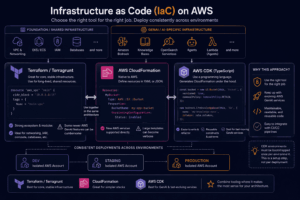
You want your infrastructure and resources to be created using IaC, meaning that your infrastructure is reproducible and can be deployed consistently depending on which environment it runs in.
When building the infrastructure, you have a few options for IaC tooling, and it is worth discussing which one is a better fit and why.
The main options are Terraform, CloudFormation, and AWS CDK.
Terraform / Terragrunt
Terraform can absolutely be used for defining IaC, and it is a good fit for many parts of your AWS infrastructure. However, for agentic AI workloads on AWS, it may not always be the most convenient option.
The main reason is that GenAI services on AWS are evolving quickly, and some newer AWS resources or features can be more cumbersome to manage through Terraform. For example, managing things like OpenSearch Serverless, Bedrock-related resources, policies, or newly introduced capabilities can sometimes require additional configuration or workarounds.
This does not mean you should replace Terraform completely. You can still keep your main infrastructure, such as EKS/ECS, networking, IAM, databases, and other shared resources in Terraform or Terragrunt.
However, for the agentic AI part of the infrastructure, it can make sense to use tooling that is more natively integrated with AWS and easier to maintain as AWS services evolve.
CloudFormation
CloudFormation is also a good option because it is natively supported by AWS.
You define your resources in YAML or JSON, reference them between each other, and CloudFormation handles the deployment and lifecycle of those resources.
The advantage is that new AWS services and capabilities are usually supported directly through CloudFormation. The downside is that larger templates can become verbose and harder to maintain.
For relatively small infrastructure stacks, CloudFormation can work perfectly well.
AWS CDK
AWS CDK would probably be my choice for the agentic AI part of the deployment.
Under the hood, CDK still generates CloudFormation, but instead of writing large YAML templates, you define your infrastructure using a programming language such as TypeScript.
This makes it easier to create reusable components, share configuration between environments, add conditions, and keep more complex infrastructure readable.
Your main infrastructure, such as ECS/EKS, networking, IAM, and other shared components, can still remain in Terraform or CloudFormation. But for Bedrock, OpenSearch, knowledge bases, agents, agents related lambdas and other GenAI-specific AWS resources, CDK can often make development faster and easier to maintain.
CDK environments do need to be bootstrapped before deployment, but this is normally an environment setup step rather than something you need to run during every deployment. Once that is done, CDK fits quite naturally into a CI/CD workflow.
Ci/CD Pipelines
For CI/CD pipelines, you seem to have a few options I can think of.
Your Git Host
Whether you use GitHub, Bitbucket, GitLab, or any other Git repository to host your codebase, they usually provide their own pipelines that you can use. For example, GitHub provides GitHub Actions, and others have their own alternatives as well.
This seems like the most plausible option to me, because you can make reviews part of your pipeline, and most of the time your subscription already includes some free usage.
If you want to run this on your own host rather than using shared infrastructure, you would need to set up your AWS infrastructure to run the pipelines.
AWS CodePipeline
Another option is AWS CodePipeline, together with CodeBuild and CodeDeploy. This can also be a good alternative if you want to keep your infrastructure AWS-native. Though, for me, using the pipeline solution provided by your own codebase host seems like the more plausible option in most cases.
AWS CodePipeline could be better suited if you have Lambda functions and want to use things like canary deployments. Though you can achieve the same with your own Git host, this can be much easier with AWS-native tooling.
Another advantage is that you can run the pipeline inside your own VPC rather than outside of it.
Third-Party Tools
Another option would be to use third-party pipeline tools such as CircleCI. They may have some useful integrations, for example when you have a large codebase and need to run tests in parallel for faster pipeline execution.
But unless you have a really good reason, I don’t see why you shouldn’t run your pipeline using AWS CodePipeline or the CI/CD tooling provided by your Git host.
All in all, if you decide to run your pipelines outside of AWS CodePipeline, make sure to use OIDC-based access for authentication rather than long-lived IAM secrets.
Security
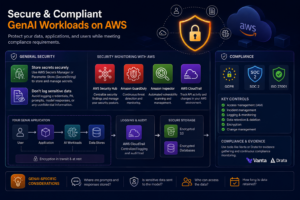
For Gen AI applications, compliance is another important topic. What matters most is what you want to achieve.
If you’re going to operate in the EU, then GDPR is a must. Maybe you also want to achieve SOC 2 or ISO 27001 compliance, which would require a different level of configuration and operational controls.
All in all, whether you want to achieve any specific compliance or not, you should make sure to run your AI workloads securely on AWS. To achieve that, there are a few things you should take care of.
General Security
Make sure you store your secrets in AWS Secrets Manager, or Parameter Store if there is a good reason to use it. Parameter Store also supports encrypted sensitive values through SecureString.
Additionally, make sure you don’t log any sensitive information, such as credentials, personal data, prompts, or model responses containing confidential information.
There are also some AWS services you can configure for security monitoring:
- Security Hub – for centralizing security findings and managing your overall security posture.
- GuardDuty – for continuous threat detection and monitoring.
- Amazon Inspector – for vulnerability scanning and vulnerability management.
- CloudTrail – for tracking what actions were performed in your AWS environment and by whom.
Compliance
Depending on whether you need to meet requirements such as SOC 2, ISO 27001, or GDPR, your security posture may look quite different.
You may need to set up additional controls around access management, incident management, logging, data retention, encryption, and change management.
You may also need additional tools such as Vanta or Drata for evidence gathering and compliance monitoring. In that case, you should make sure your controls are also mapped to your Gen AI services and workloads, and not only to your traditional infrastructure.
For Gen AI applications specifically, you should also think about where prompts and model responses are stored, whether sensitive data is sent to the model, who can access that data, and how long it is retained.