

If you are moving containers to AWS, you will run into this question early. Amazon gives you two main ways to run containers: ECS (Elastic Container Service) and EKS (Elastic Kubernetes Service). Both will get your containers running in production. Both integrate with the rest of AWS. But they are built on very different ideas, and the choice you make here will shape your team’s workflow for years.
This article breaks down what each service actually is, how they compare technically, when to use one over the other, and how they handle multi tenancy. By the end, you should be able to make this decision with confidence instead of guessing.
What ECS and EKS Actually Are
ECS and EKS both are AWS container orchestration services.
ECS is Amazon’s own container orchestration service. It was built by AWS, for AWS, and it only runs on AWS. You describe your application as a task definition, tell ECS how many copies you want running, and it handles placing those containers on compute, keeping the right number alive, and replacing anything that fails.
EKS is Amazon’s managed version of Kubernetes. Kubernetes is an open source orchestration system that was originally built at Google and is now maintained by the Cloud Native Computing Foundation. With EKS, AWS runs and patches the Kubernetes control plane for you, but you are still running actual Kubernetes underneath. That means the same YAML files, the same command line tool (kubectl), and the same ecosystem of tools that work on any other Kubernetes cluster, whether that is Google’s GKE, Microsoft’s AKS, or a cluster running on your own hardware.
This difference matters more than it looks at first glance. ECS locks you into AWS. EKS gives you a layer of portability, since the workloads you define could, in theory, run anywhere Kubernetes runs.
Container Orchestration
Before comparing the two further, it helps to be clear on what container orchestration actually does, since this is the job both services are doing under the hood.
When you run containers at any real scale, you cannot just start them manually on a server and hope for the best. You need something that will:
- Decide which physical or virtual machine each container should run on
- Restart containers that crash or fail health checks
- Scale the number of running copies up or down based on load
- Route network traffic to the right containers
- Roll out new versions without downtime
- Handle secrets, configuration, and storage for each container
That “something” is the orchestrator. ECS and EKS are both trying to solve this same problem, but they take different approaches to how much control you get, how much complexity you have to manage, and how much you have to learn to use them well.
Technical Capabilities
This is where the real differences start to show up, and where most teams either fall in love with Kubernetes or decide it is more machinery than they need.
EKS and Kubernetes: Powerful, but You Pay for It in Complexity
EKS gives you the full Kubernetes API. That includes pods, deployments, services, ingress controllers, config maps, secrets, custom resource definitions, and a huge ecosystem of add ons for logging, monitoring, service mesh, and security. If there is a container use case you can imagine, someone has probably already built a Kubernetes tool for it.
One of the strongest arguments for EKS today is Karpenter, AWS’s own open source node autoscaler for Kubernetes. Karpenter watches your pending pods and provisions exactly the right instance types and sizes to fit them, often within seconds, instead of relying on fixed instance groups. It can also consolidate workloads onto fewer nodes as demand drops, and it takes Spot pricing into account automatically. Compared to the older Cluster Autoscaler, Karpenter is faster to react and much better at fitting workloads efficiently onto available capacity.
ECS also has autoscaling, both for the number of running tasks (service autoscaling) and for the underlying compute if you are running on EC2 (through Capacity Providers) or none at all if you are running on Fargate. It works well and it is genuinely simpler to set up. But it does not give you the same fine grained control over bin packing and instance selection that Karpenter gives EKS users. If your workloads are highly variable in shape and size, and you are trying to squeeze out every bit of cost efficiency at scale, EKS with Karpenter has a real technical edge.
Resource Requests and Limits: A Powerful Way to Optimize Large Scale Systems
Kubernetes forces you to think in terms of resource requests and limits for every container. A request is the amount of CPU and memory you are telling the scheduler your container needs in order to be placed. A limit is the ceiling the container is not allowed to cross.
This sounds like a small detail, but it has a big effect at scale. If your requests are set too high compared to what your containers actually use, your cluster autoscaler (or Karpenter) will keep nodes running that are mostly idle, and you end up paying for capacity you never use. This is one of the most common and most expensive mistakes teams make once they move to Kubernetes: nodes sitting at 5 to 10 percent utilization because every team set generous requests “just to be safe,” and nothing ever forced those numbers to be revisited.
Done correctly, tuning requests and limits against real usage data can cut compute costs dramatically, sometimes by well over half, without touching a single line of application code. This is a lever that Kubernetes gives you and forces you to actively manage. ECS has an equivalent concept through CPU and memory settings in the task definition, but because ECS tasks are usually sized more coarsely and teams often run fewer, larger services, this kind of granular optimization tends to matter less in day to day operations, simply because there are fewer moving parts to tune.
YAML Configs vs Task Definitions
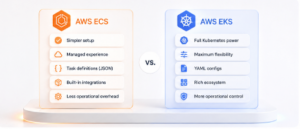
In EKS, almost everything is defined in YAML. Deployments, services, config maps, ingress rules, and autoscaling policies are all YAML files that get applied to the cluster with kubectl. This gives you enormous flexibility and makes everything version controllable and reviewable in a pull request. It also means your team needs to actually understand Kubernetes YAML, which has a learning curve of its own, including things like indentation sensitivity, API versions, and how different resource types relate to each other.
In ECS, the equivalent is the task definition, a JSON (or console driven) description of your container image, CPU and memory, networking mode, environment variables, and logging configuration. Task definitions are simpler to read and write, especially for teams that are not already comfortable with Kubernetes concepts. There is less to configure, but also less to configure wrong. For teams without dedicated infrastructure engineers, this simplicity is often the deciding factor.
Usage
Once you get past the technical comparison, the real world question is: who is actually going to run this thing day to day?
ECS Is Easier to Use
ECS is the better fit if you are a small team, or a team without dedicated platform engineers. You can go from zero to a running, autoscaling, load balanced service in an afternoon, especially if you use Fargate and never have to think about the underlying servers at all. AWS support covers ECS directly as a core AWS service, so when something goes wrong, you are troubleshooting with AWS’s own support team rather than trying to work out whether the problem is in Kubernetes itself, in an add on, or in your own configuration.
This makes ECS a strong choice for startups, small to mid sized companies, and any team that wants a managed service they do not have to babysit. You give up some flexibility, but you get a much smaller operational burden in return.
EKS Is Harder, but Better for Large Teams and Isolation
EKS asks more of you upfront. You need to understand Kubernetes concepts, manage add ons, keep the cluster and node groups patched, and build some amount of internal tooling or documentation so that application teams can use the cluster without needing to become Kubernetes experts themselves.
In exchange, you get a platform that scales well with organizational complexity. Large companies with many teams, many services, and different compliance or isolation requirements tend to gravitate toward EKS because Kubernetes gives you strong primitives for isolating workloads from each other, standardizing deployment patterns across teams, and plugging into a huge ecosystem of tooling for observability, security scanning, and policy enforcement. If you expect to have dozens of teams and hundreds of services running on the same infrastructure, EKS is usually worth the extra complexity.
Multi Tenancy
Multi tenancy means running workloads from multiple teams, clients, or environments on shared infrastructure, while keeping them properly separated. Both ECS and EKS can do this, but the mechanisms look quite different.
Multi Tenancy in ECS
ECS multi tenancy usually happens at the level of clusters, services, and AWS accounts. A common pattern is one ECS cluster per environment (staging, production) or per business unit, with services separated logically inside the cluster. Isolation between tenants is enforced mostly through IAM roles, security groups, and separate task definitions, rather than through a dedicated namespace concept. For stricter isolation, many teams simply use separate AWS accounts per tenant, tied together with AWS Organizations, which sidesteps the need for fine grained in cluster isolation entirely.
Multi Tenancy in EKS
Kubernetes gives you a built in construct for this: the namespace. Each team, client, or environment can get its own namespace, with its own resource quotas, network policies, and role based access control (RBAC) rules controlling who can see or touch what. This makes it possible to run many tenants inside a single cluster while still enforcing real separation between them.
Namespaces and Resource Quotas
Namespaces alone are just a naming boundary. To make multi tenancy actually work, you pair namespaces with ResourceQuotas (limiting how much CPU, memory, and object count a namespace can consume) and LimitRanges (setting default and maximum resource requests per container). Without these, one noisy tenant can quietly consume most of the cluster’s capacity and starve everyone else.
Network Policies
By default, every pod in a Kubernetes cluster can talk to every other pod, which is rarely what you want in a multi tenant setup. Network policies let you restrict traffic so that, for example, workloads in the “client-a” namespace cannot reach workloads in “client-b” at all, even though they are running on the same physical nodes. This is enforced by the CNI plugin you are using, so the specific capabilities depend on which networking add on your cluster runs.
RBAC and Access Control
Role based access control determines which users and service accounts can read, create, or modify resources, and in which namespaces. A well designed RBAC setup means a developer on one team can deploy and debug their own services without ever having the permissions to touch another team’s namespace, let alone the cluster’s core configuration.
Node Level Isolation
For tenants that need stronger guarantees than software level isolation, both services offer node level separation. In ECS, you can dedicate specific EC2 instances or Fargate profiles to particular workloads. In EKS, you can use taints, tolerations, and node selectors to make sure that sensitive or high compliance workloads only ever land on nodes reserved for them, physically separating them from other tenants even inside the same cluster.
Which One Should You Choose
If your team is small, your workloads are relatively simple, and you want to move fast without hiring a dedicated platform team, ECS is very likely the right call. It gets out of your way and lets AWS carry most of the operational weight.
If you are running dozens of services across multiple teams, need portability across cloud providers, or expect to need fine grained control over scaling, isolation, and cost optimization, EKS is worth the investment in learning curve and operational overhead. The Kubernetes ecosystem, tools like Karpenter, and the ability to tune resource requests and limits at a granular level give you levers that ECS simply does not offer to the same degree.
There is no universally correct answer here. The right choice depends on your team’s size, your compliance requirements, and how much operational complexity you are willing to take on in exchange for flexibility. What matters most is making the decision deliberately, based on where your organization actually is today and where it is realistically headed, rather than choosing Kubernetes because it is the more talked about option.